Here’s a quick post for those looking for a quick side-by-side comparison of ChatGPT and the various Chatbots in the Microsoft ecosystem. This table is a short excerpt from the upcoming 2nd edition of our book: The Microsoft Office 365 and SharePoint Online Cookbook, which features a chapter on Generative AI and Copilot in Microsoft 365, co-authored with GPT! A more detailed post describing each of these Chatbots will follow but I at least wanted to post this quick comparison in the hope that someone will find it useful!
Chatbots: Comparing ChatGPT, Bing Chat, Bing Enterprise Chat and M365 Chat
Posted in Uncategorized
Tagged AI, Artificial Intelligence, Bing, Bing Chat, Chatbot, ChatGPT, Copilot, GPT, M365, Microsoft 365, OpenAI
Leave a comment
Move list item to a folder in SharePoint Online using PowerShell
There are many examples on how to move files using PowerShell in SharePoint Online document libraries. At least at the time of writing, there’s no guidance on how to programmatically move list items to folders within lists in SharePoint Online. If you have enabled folder creation in a SharePoint online list and would like a script to programmatically move items to it, here it is:
cls

#region declarations
$siteUrl = "https://tenant.sharepoint.com/sites/StarkEnterprises"
$listTitle = "Suites"
$itemId = 8 #you will likely have additional logic to get this programatically but this is just an example
$destFolderServerRelativeURL= "/sites/StarkEnterprises/Lists/Suites/Mark 1-10/" #destination folder
#endregion

#region move item
Connect-PnpOnline -Url $siteUrl -Interactive
$listItem = Get-PnPlistItem -List $listTitle -Id $itemId
$srcItemUrl = $listItem.FieldValues.FileRef #complete item url
$srcFolderServerRelativeURL = $listItem.FieldValues.FileDirRef #source directory
$destFileUrl = $srcItemUrl.Replace($srcFolder, $destFolderServerRelativeURL);

#Assumes the folder exists but may want to check for it first
Move-PnPFile -SourceUrl $srcItemUrl -TargetUrl $destFileUrl
#endregion
The prerequisites for running the script are:
- You will need to have the PnP PowerShell module installed
- You will need to have enabled Folder creation for lists via your list settings page
- You will of course need to have contribute or higher permissions to both the source and destination to be able to execute this Move operation
You can also refer to this post if you’d like to programmatically create folders using PowerShell: Create folder in a SharePoint Online list using PowerShell
Thanks and hope this helps someone!
Posted in Uncategorized
Tagged SharePoint, SharePoint Online, PnP, PnP PowerShell, PowerShell, M365, SPO, First Published Here
Leave a comment
Create folder in a SharePoint Online list using PowerShell
There are many examples on how to create folders using PowerShell in SharePoint Online document libraries. At least at the time of writing, there’s no guidance on how to programatically create folders in SharePoint lists. It may not be a common scenario but here’s the script if you have a need to do so:
cls

#Since the time I wrote the original script (all the way to the bottom),
# I found out that you can achieve this using
# the Add-PnPFolder command. I have therefore commented out
# the earlier script I wrote towards the bottom. Thanks!

#region declarations
$siteUrl = "https://tenant.sharepoint.com/sites/StarkEnterprises"
$folderName="Mark VIII"

#Note that the command expects the list "url name" instead of the display title
# Also note that the url name not be encoded
# so use "Lists/Awesome Suites" instead of "Lists/Awesome%20Suites"
$parentFolderRelativeURL = "Lists/Awesome Suites"

#The following would create a subfolder under the "Mark I to X" folder instead of the root
#$parentServerRelativeUrl= "Lists/Awesome Suites/Mark I to X"

#endregion

#Add folder to list
Add-PnPFolder -Name $folderName -Folder $parentFolderRelativeURL

<#
#region declarations
$siteUrl = "https://tenant.sharepoint.com/sites/StarkEnterprises"
$listTitle = "Suites"
$folderName="Mark VIII"
$parentServerRelativeUrl= "/sites/StarkEnterprises/Lists/Suites" #create folder at the root of the list

#The following would create a subfolder under the "Mark I to X" folder instead of the root
#$parentServerRelativeUrl= "/sites/StarkEnterprises/Lists/Suites/Mark I to X"

#endregion

#region connect to the site and get the list object
Connect-PnpOnline -Url $siteUrl -Interactive
$ctx = Get-PnPContext

$list = $ctx.web.Lists.GetByTitle($listTitle)
$ctx.Load($list)
$ctx.ExecuteQuery()
#endregion

#region create the ListItemCreationInfo object
$listItemInfo = New-Object Microsoft.SharePoint.Client.ListItemCreationInformation
$listItemInfo.FolderUrl = $parentServerRelativeUrl
$listItemInfo.LeafName=$folderName
$listItemInfo.UnderlyingObjectType = [Microsoft.SharePoint.Client.FileSystemObjectType]::Folder
#endregion

#region create the folder using the listItemInfo
$listItem = $list.AddItem($listItemInfo)
$listItem["Title"] =$folderName
$listItem.Update()
$Ctx.ExecuteQuery()
#endregion
#>
The prerequisites for the script are:
- You will need to have the PnP PowerShell module installed
- You will need to have enabled Folder creation for lists via your list settings page
- You will of course need to have contribute or higher permissions to the list or folder underneath which you’d like to create the new folder
That’s it. Hope this helps someone!
Posted in Uncategorized
Tagged First Published Here, M365, PnP, PnP PowerShell, PowerShell, SharePoint, SharePoint Online, SPO
Leave a comment
Permission Level comparison for SharePoint
Permissions in SharePoint are managed through Permission Levels. Each permission level in turn maps to multiple permissions (things that you can OR cannot do in the different areas in SharePoint). There’s a lot of excellent guidance om what the different permission levels in SharePoint allow you to do. I did not however find a quick comparison around the different permissions each permission level maps to. So thought I’ll put together a quick spreadsheet showing the differences between the more common permission levels in SharePoint.
So here it goes – nothing fancy – just a quick comparison of the more common SharePoint permission levels, pulled together through an Excel online spreadsheet:
Posted in Quick Tips, SharePoint, SharePoint Online, Tools
Tagged Microsoft SharePoint, Office 365, SharePoint, SharePoint Online
2 Comments
In browser viewing of Zip files in SharePoint Online
I have been toying (more like sitting on it :|) with the idea of creating an app for in-browser extraction of zip files that have been uploaded to SharePoint document libraries. It seems now however that Microsoft beat me to it. 🙂
If you have modern libraries enabled in your O365 tenant and you click on a zip file uploaded to a library, you will now notice that SharePoint will actually show you all the files within that archive within the browser – effectively extracting the zip file for you in the browser. You can then chose to download the entire archive or browse through folders and sub folders in the zip archive to download individual OR multiple files & folders from the archive. You still are not able to view in the browser the files from the archive so may be my app is still viable for now lol
A picture speaks (on in this case pictures) more than a thousand words so here it goes:

Fig 1: A Zip file in a modern SharePoint library
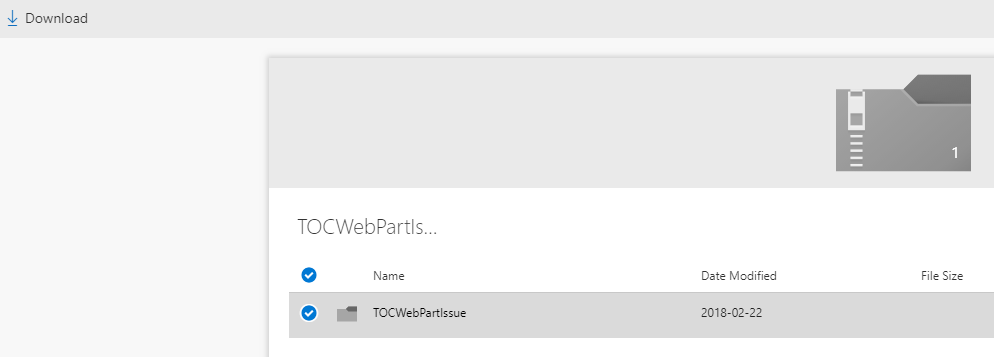
Fig 2: Zip file expanded to the first level
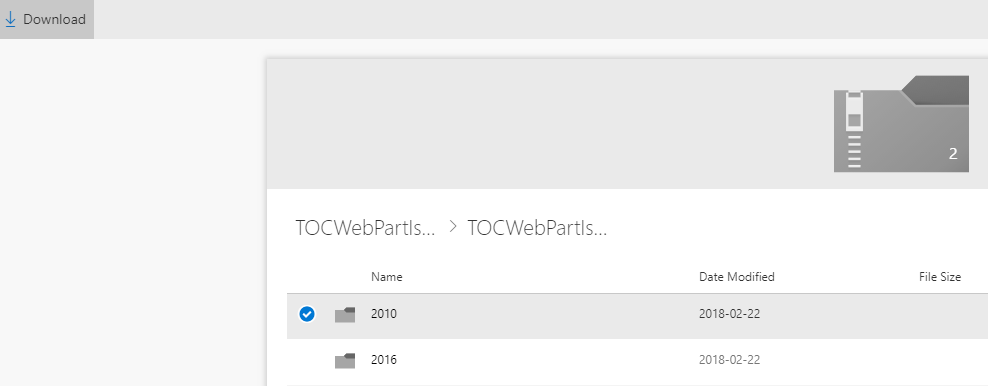
Fig 3: Zip file expanded to the second level – notice how you can choose to download a single folder from the zip archive
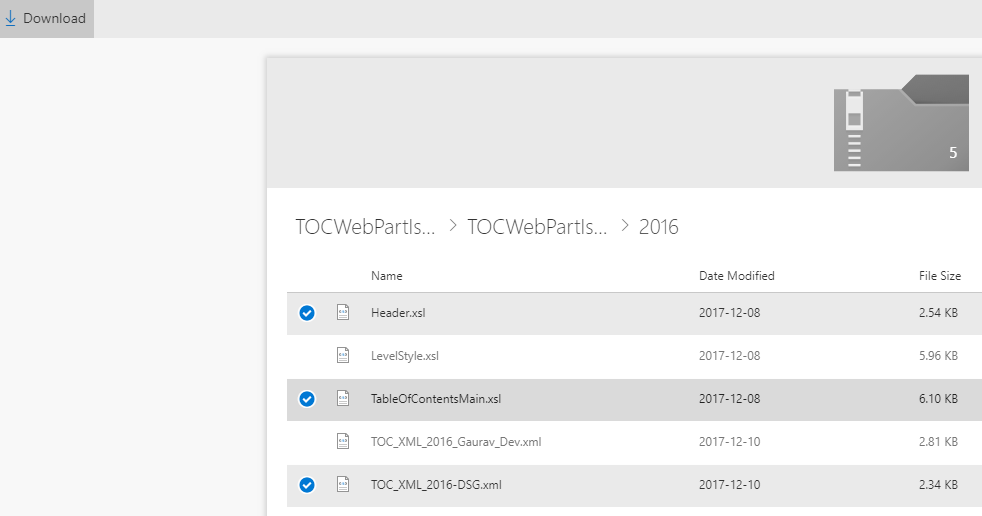
Fig 4: Zip file expanded to the third level – again, notice how you can choose to download multiple files from the zip archive
Posted in Quick Tips, SharePoint, SharePoint Online
Tagged Office 365, SharePoint, SharePoint Online
9 Comments
SharePoint Server 2013 Virtual Machine Download – March 2018
The latest version of my SharePoint 2013 trial VM can be downloaded from my shared drive here: https://sp2013vm.page.link/download
I will encourage you to refer the complete details regarding the VM, download instructions, validity of the trial licenses and details on converting to retail licenses through my detailed original post here: SharePoint Server 2013 Virtual Machine Download
I have disabled comments on this post but please feel free to comment and/ or report any issues through the above post. This way any reported issues and resolution to those issues will stay in one place. 🙂
Good luck and hope you find the VM useful!
Gaurav
SharePoint Server 2016 Virtual Machine Download – March 2018
The latest version of my SharePoint 2016 trial VM can be downloaded from my shared drive here: https://sp2016vm.page.link/download
I will encourage you to refer the complete details regarding the VM, download instructions, validity of the trial licenses and details on converting to retail licenses through my detailed original post here: SharePoint Server 2016 Virtual Machine Download
I have disabled comments on this post but please feel free to comment and/ or report any issues through the above post. This way any reported issues and resolution to those issues will stay in one place. 🙂
Good luck and hope you find the VM useful!
Gaurav
SharePoint Server 2016 Virtual Machine Download (Updated March 2018)
I earlier created this SharePoint 2013 Virtual machine on Win Server 2012 way back in Jan 2014 and have been updating it hence. 3 Years and thousands of downloads later I have received numerous requests for a similar SharePoint 2016 VM. I finally got the time to create one for everyone’s benefit. Following are the details of this SharePoint 2016 evaluation VM and how to download it:
- The VM was created using the VMWare Player version 6.0.3 which can be downloaded as a free download from the VMWare site. You can use the latest version of the free tool to launch it. Once you have downloaded it, you can also convert it into other formats to open it with another virtualization tool of your choice.
- It was created using the 180 day evaluation versions Windows Server 2012 R2, SQL Server 2016 and the SharePoint Server 2016 Trial license (Feb 2018 CU). If you’d like to, you can enter your own keys to activate the trial/ evaluation versions. These 180 day evaluation versions should be good through Sep 8th, 2018
Jan 29, 2018. - It consists of 4 hard drives, a VMWare virtual machine configuration (.vmx) file and other supporting VMWare files. All the files and hard drives are part of 12 self-extracting compressed files. The total size of the compressed files is 11GB (with the total size of the extracted files at about 28 GB). These self-extracting(executable) archive can be downloaded from the download link mentioned below.
- The VM has 16 GB RAM allocated to it by default (controlled by the settings in the “.vmx” file or via the virtual machine settings in the VMWare player). You can reduce or increase the RAM to suite your needs, although, 12 GB is the minimum required and 16 GB is what I will recommend for this VM.
- It has the Classic Shell start menu installed from http://classicshell.sourceforge.net/ so you can get the old Windows start menu in addition to the new Windows “Start screen”. This also results in Windows booting up to the desktop instead of the new Windows start screen. Although, if you’d like to, you can get to the Start screen by clicking the Shift+Windows button combination. You can also configure Classic Shell so Windows boots up to the start screen instead, if you so desire.
- It has the gmsp2016.dev as the Active Directory domain and has the apps service configured to use the apps.gmsp2016.dev app domain.
- Once you start the VM, Windows will auto login to the SP_Admin account. This “gmsp2016\sp_admin” account was the account used to install SharePoint and should be used to access central admin. All accounts in the VM share the same password which is part of the ReadMe file accompanying the downloads.
- The virtual machine additionally has the following accounts created and used for various services:
- SP_Farm: The farm account
- SP_CacheSuperReader: The object cache read access account
- SP_CacheSuperUser: The object cache full access account
- SP_ExcelUser: Account used for excel services (not yet configured on the VM)
- SP_PeffPointUser: Account used for performance point services (not yet configured on the VM)
- SP_PortalAppPool: Account for the content web application pools
- SP_ProfilesAppPool: Web app pool for the MySites web application (not yet configured on the VM)
- SP_ProfileSync: The user profile synchronization account
- SP_SearchContent: The default content access account for the Search Service Application
- SP_SearchService: Account to run the SharePoint Search “Windows Service
- SP_Services: Service Applications App Pool account
- SP_VisioUser: Account used for Visio services (not yet configured on this VM)
- SQL_Admin: Used to Install the SQL Server
- SQL_Services: SQL service account for the MSSQLServer & SQLServerAgent services
You can read more on different accounts for SharePoint in the following articles: http://technet.microsoft.com/en-us/library/cc263445(v=office.15).aspx & http://www.toddklindt.com/blog/Lists/Posts/Post.aspx?ID=39
- If the VM does not start after you have downloaded it, ensure that the number of files you have downloaded, the total size of the archived files and the total size of the extracted files matches what’s specified above.
Finally, all the files, including the ReadMe.txt are uploaded to the Google Drive folder at the following link: https://sp2016vm.page.link/download
You can download the files, using one of the following options:
- Add the folder to your Google Drive and then use the Google Drive Desktop Client to sync the files to your local computer (highly recommended) OR
- Download the files directly by using the browser “Save target as…” functionality (not really recommended and should be used if for some odd reason #1 does not work for you) OR
- There might be some download managers as well that might allow you to specify a google drive URL and download all files from their but I am not aware of any at the moment
Instructions for extracting the VM: You will need to download all the .rar and .exe files to your machine and then run the “SP2016.part01.exe” executable to unpack the virtual machine hard drives. After ensuring that you have the latest version of the VMWare Player installed, you can then double-click the “SP2016.vmx” file to run the virtual machine.
Instructions to activate the licenses: Here’s how you can activate the licenses for:
- For the OS (Windows Server 2012 R2): You can view the instructions in the comments for my previous blog here or in the corresponding TechNet article here
- For SQL Server 2016: Unfortunately there’s no way to rearm a SQL Server Evaluation license. You will have to convert it to a retail license. The way to do that is to:
- Run the SQL Server setup
- Click on the maintenance tab
- Click on “Edition upgrade”
- Follow the steps till you reach the product key screen and enter your product key (usually pre-filled if a licensed installation media is used)
- You can read a good set of instructions for converting your eval license to a full license here: http://www.mssqlgirl.com/upgrading-from-sql-server-2012-evaluation-edition.html
- For SharePoint Server 2016:
- Browse to Central Admin –> Upgrade and Migration –> Convert farm license type
- On the Convert License Type page, in the Enter the Product Key box, type the new product key and then click OK.
- Verify that the license is upgraded by going back to the page
- Please note that the SharePoint 2016 trial is only available as an Standard trial. Consequently only Standard features are available by default. The good thing however is that you can easily upgrade your farm license type by entering the Enterprise License Key.
Please do not forget to refer the comments from my previous post if you run into any issues or have questions. The comments contain lots of information on the different environments in which people are using the similar SharePoint 2013 VM, any issues they’ve run into and solutions to those issues.
I hope you will find the VM useful. If you did, or if you have any questions or feedback, I will encourage you to leave a comment below OR reach out through my twitter handle: @mahajang!
Happy SharePointing! 🙂
Turn off the mobile view in SharePoint/ Office 365/ SharePoint Online
The Microsoft team recently released the SharePoint mobile app for iOS: https://blogs.office.com/2016/06/21/your-intranet-in-your-pocket-the-sharepoint-mobile-app-for-ios-is-now-available/
While the app in itself is pretty neat, it comes with it’s own limitations just like any other mobile app. The same holds true for the view of SharePoint sites that you see in a mobile browser. This is especially true if you have followed the principles for a responsive UI while building your site. So the question on how to turn off the mobile view has come up quite a few times during my SharePoint consulting engagements. Hence this quick post:
The easiest way to turn off the mobile view in your SharePoint 2013 or Share Point 2016 or Office 365 – SharePoint Online site is to deactivate the “Mobile Browser View” feature for the site:
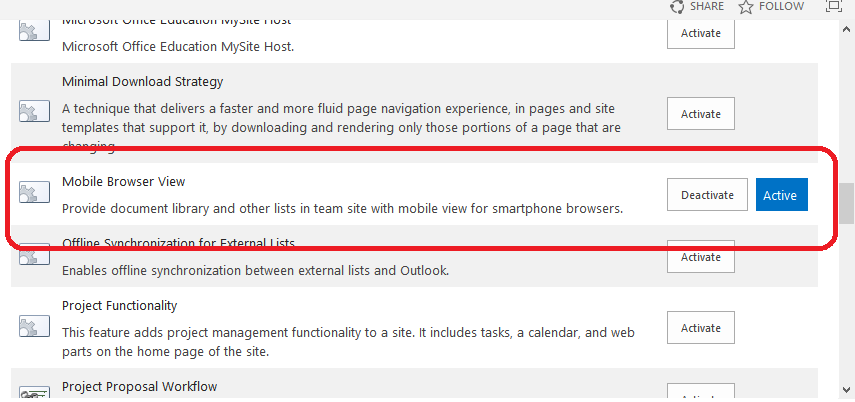
For those who are new to SharePoint, you can do this as follows:
- Click the gear icon on the top right corner of you site
- Click “Site settings”
- Click “Manage site features” under the “Site Actions” heading on the page
- Click the “Deactivate” button for the “Mobile Browser View” feature
One thing to keep in mind is that this is a site level feature. So turning it off for the site in question will not turn it off for the sub-sites or any other sites in your environment.
Besides the above method that I recommend, their are other ways of accomplishing this such as the following:
- Use PowerShell to turn it off on all existing sites (Limitation: Only works on existing sites)
- Use Devise Channels (Limitation: Only works in publishing sites)
- Disable the default mobile redirect behavior in the App_Browsers\compat.browser file for the IIS Website for your SharePoint web application (Limitation: Only works on-prem – not in SharePoint Online)
I hope the above is useful for someone. Time to get back to speaker selections for SharePoint Saturday Pittsburgh 🙂
Posted in Quick Tips, SharePoint 2013, SharePoint Online
Tagged Office 365, Sharepoint 2013, SharePoint 2016, SharePoint Online
Leave a comment
Community Portal and Custom Master Page – Solved!
Working with SharePoint has it’s Aha moments! And when you work on multiple consulting projects as an Infrastructure Architect, Information Architect and Developer all in one, trust me you come across a lot of them 🙂 One such moment was on a SharePoint 2013 Intranet roll out that I’ve been working on.
One of the key aspects of an intranet roll out is its Branding. Among other things, the branding minimally involves a color scheme, standard fonts, a logo and/ or a company banner. More often than not, it also involves applying a custom master page to incorporate such branding elements. COmpared to it’s predecessor, SharePoint 2013 has simplified the process quite a bit with a unified seatle.master being used as a common master page across most site templates (to be honest I haven’t had the chance to verify all templates yet and have so far not found a resource that points me to such a list). So naturally based on this understanding, I was hoping for the SharePoint 2013 Community Portal to work just fine with my custom master page (which was based on seattle.master). Only that it does not (Aha moment #1 :)).
A little bit of looking around revealed that the home page of the Community portal was still the primitive default.aspx. Looking at the page through SharePoint designer revealed that the master page for the page was set to the seattle.master (Aha moment #2):

So the obvious and quickest approach would be to use SharePoint designer to customize the default.aspx except that I would not recommend it for the following reasons:
- SharePoint Designer customizations should be avoided as much as possible for multiple reasons that go beyond the scope of this post and
- Even if you customized default.aspx to point to a different master page, you would receive multiple errors (which by the way, even if you resolve will still not help in bringing a lot of branding over) since the page has primitive markup in it 😐 which will not work with the newer master pages
The solution to the problem is rather a multi step approach:
- Browse to the Community Portal & Edit the default.aspx page using the browser
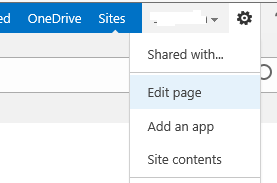
- Export the only web part on the page. Just so you know, this web part is actually a Search Results web part that has its query set to fetch only results where the Web Template is a community web site:

- Next, go to the Site Features and Activate the Wiki Home Page feature:
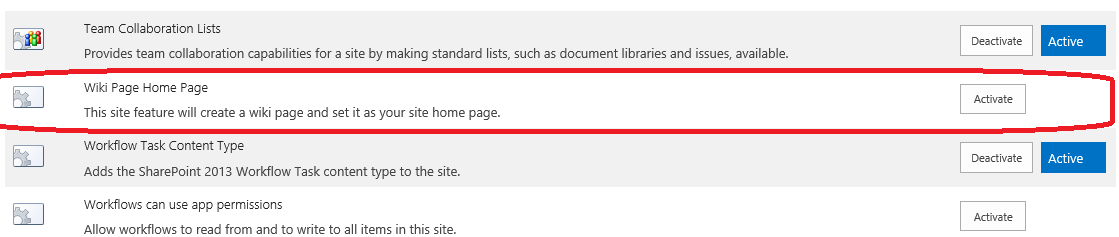
- This will create the “Site Pages” library in your site and change the home page of your site to “SitePages/Home.aspx”
- You will now see that the custom master page that you applied to your site will be applied to this page as well
- Finally, you will want to Edit the page and add it to this page:
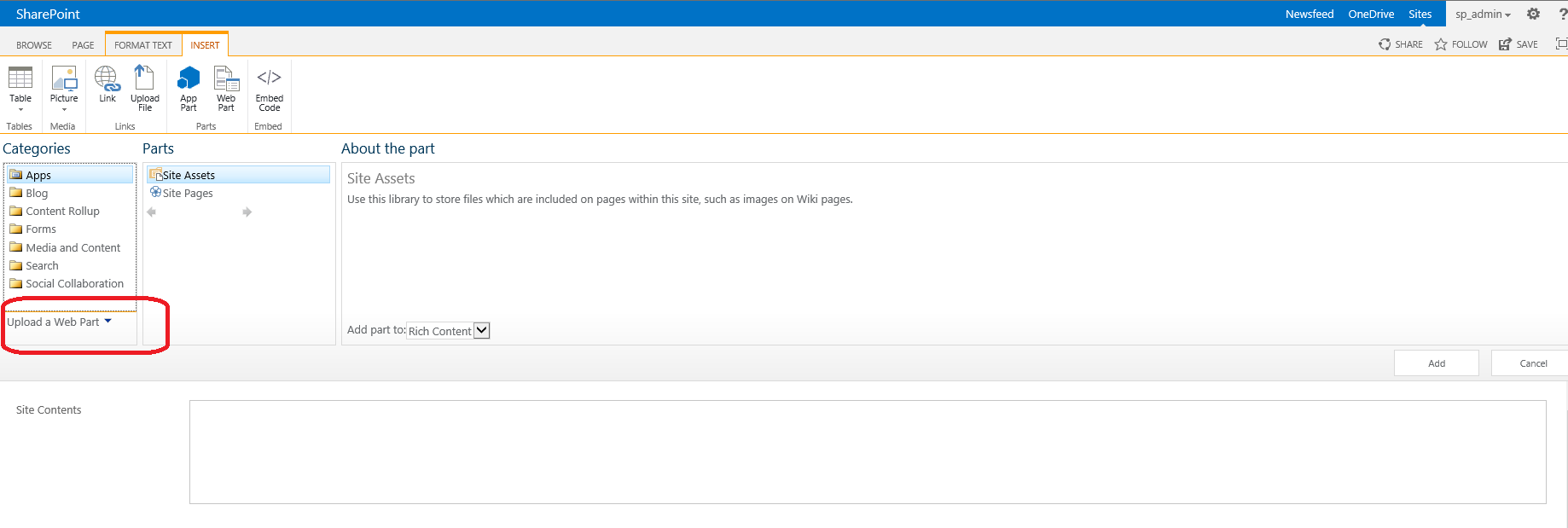
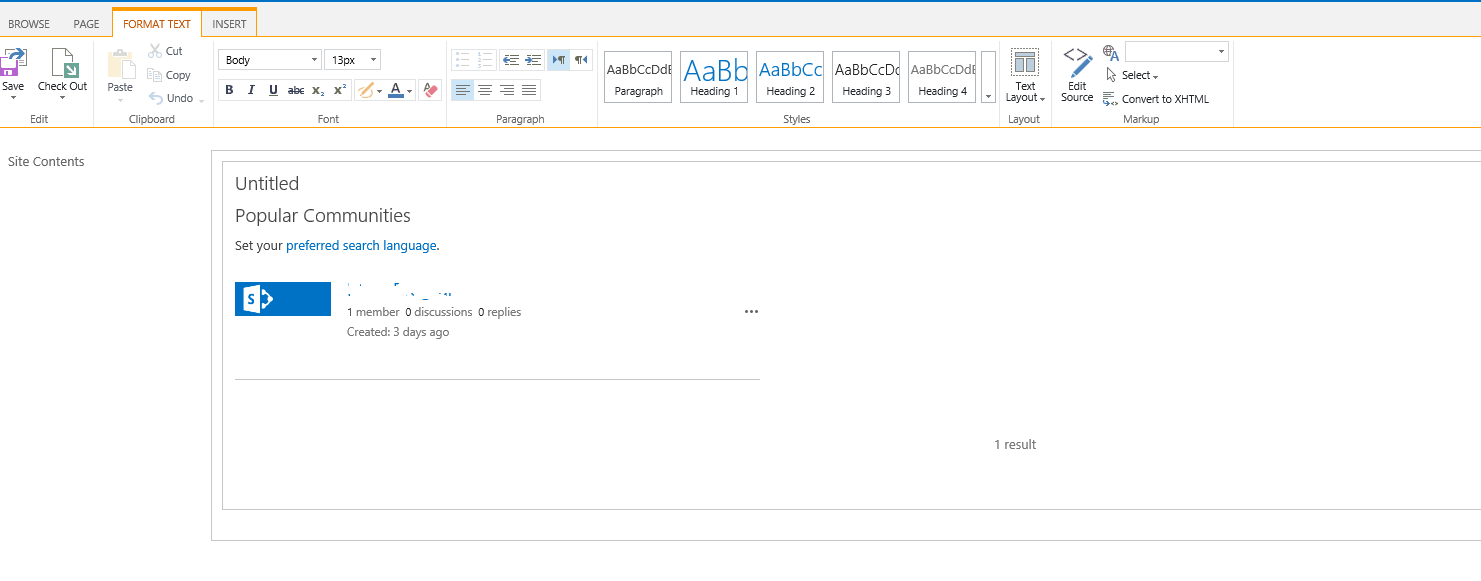
That’s it. You should now be able to see your community portal in all it’s beauty! I could not find an online resource that pointed me in the right direction as far as this issue goes so thought will create one in the hope that it benifits someone!


 Gaurav Mahajan